


Beat Tiles 2: Piano Master
3.722.00 Reviews
App Specs
- Version
- 1.4.7
- Updated On
- License
- Free
- Downloads
- 5,000,000+
- Developer
- JoyPop Games
- Categories
- Music
- Platform
- Android, iOS
Screenshots
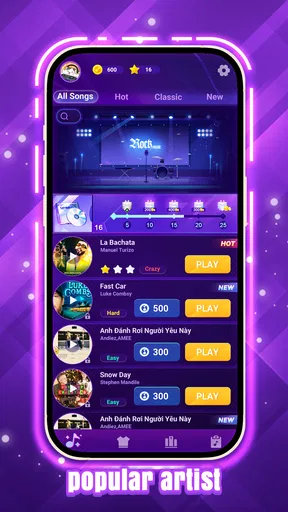

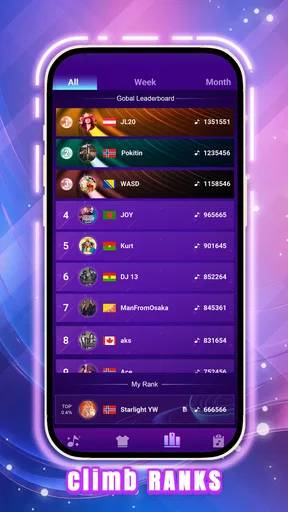
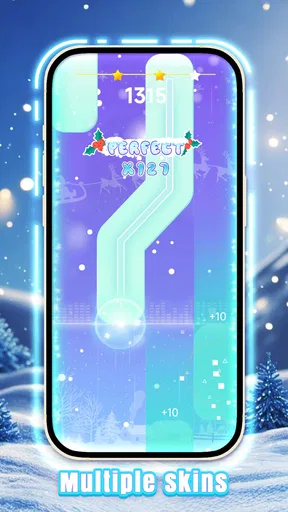

 Analysis by AppCompare
I judge a rhythm game by how quickly it gives me a reason to play again, not just by whether its first few taps feel satisfying. Beat Tiles 2: Piano Master makes a simple promise: follow the music, stay focused, and see how far your timing can take you. That direct setup suits short sessions, though it also means the game’s appeal depends on how much you enjoy repeating patterns and trying to improve. I’d consider it when I want a music-themed reflex game rather than a way to learn piano.
Small goals that make starting easy
The early draw is straightforward: tap in time and get comfortable with the rhythm. There’s no need to arrive with musical knowledge, and the basic idea is easy to understand before a session turns into a test of concentration. I like that kind of low-friction start when I have only a few minutes and don’t want to study complicated rules first.
For a new player, I’d treat the first rounds as practice rather than a score chase. Focus on watching the tiles and listening for the beat, then let speed and accuracy come with familiarity. Trying to react to every visual effect at once can be distracting; keeping my attention on the incoming pattern is a more useful habit.
What progress feels like
In a rhythm game, progress is often less about a dramatic unlock and more about noticing that a sequence which once felt frantic now feels readable. Here, the clearest personal goal is improving my own consistency: fewer missed taps, steadier timing, and a longer stretch of play before I lose the beat. That makes a quick return session satisfying even when I’m not aiming for a major milestone.
The game is free, and JoyPop Games is the developer. It has an average rating of 3.5 from around 2,700 ratings, alongside more than 20 written reviews, and has passed 5 million installs. Those figures suggest a sizable audience but a mixed response, so I wouldn’t assume it will click with every rhythm-game fan. It is rated for Everyone, was released on February 20, 2025, and version 1.3.4 supports devices running Android 7.0 or later.
Challenge, attention, and pacing
The scrolling-tile format asks for quick visual recognition and accurate timing at the same time. That combination gives the challenge a physical feel: my fingers can keep moving while my attention slips, or I can read the pattern correctly and still tap a little late. When a section gets difficult, slowing down mentally and watching the next tile rather than reacting to the last miss is a better approach than frantic tapping.
I also think about pacing in terms of session length. A music game can be energizing, but repeated attempts demand sustained attention, so it isn’t always my choice for winding down right before sleep. It fits better into a break when I’m alert enough to follow the beat. If I’m tired or distracted, I’m more likely to misread a sequence and turn a casual round into an irritating score chase.
Worth Reading Before You Choose

Flipboard Shows What News Apps Must Do Beyond the Feed

Switching to Android Auto Means Rethinking Your Driving Routine

Google Calendar Makes a Crowded Week Easier to Manage

Ludo King Makes the Most of the Minutes Between Plans

Baby Panda World Brings Quick Play to Modern Phones, but Its Game Library Feels Busy

ESPN’s Live Game View Makes Following Close Games Easier
Who will enjoy this kind of play
I’d recommend it to someone who likes compact rhythm challenges, wants a game that is easy to understand, or enjoys replaying a song-like sequence to improve. It can also work as a light introduction to timing games for a younger player, with its Everyone age rating, though a parent should still decide what is suitable for their household. It is not the right pick for someone looking for instrument lessons, detailed music theory, or a slow creative tool for composing.
Compared with rhythm games built around a controller, a dance routine, or a more involved music library, this tile-tapping approach is direct and easy to start on a phone. The trade-off is that the interaction is narrower: you’re concentrating on taps and timing rather than learning a song on an instrument or moving to choreography. If I wanted musical practice, I’d choose a teaching app; if I wanted a broader performance experience, I’d look for a game designed around that instead.
The Gameplay Experience
The first thing that struck me about Beat Tiles 2: Piano Master is how incredibly engaging it is. The game requires you to tap on tiles as they scroll down the screen, all synced perfectly with the beat of the music. It’s like having a mini-concert right at your fingertips! The interface is sleek and intuitive, making it easy for anyone to pick up and start playing instantly.
As you progress, the levels become more challenging, which keeps the excitement alive. I found myself getting lost in the rhythm, determined to beat my previous scores. The game offers a variety of songs, ranging from classical masterpieces to modern hits, so there's always something new to enjoy. Talk about a musical buffet!
Graphics and Sound Quality
This game doesn’t just sound good; it looks good too. The graphics are vibrant and dynamic, creating an immersive experience that makes you feel like part of the music. The visual effects, especially when you hit a perfect note streak, are incredibly satisfying. It's as if the game rewards you with a mini light show every time you nail a sequence.
The sound quality is top-notch, which is crucial for any music-based game. The notes are crisp, and the transitions between tunes are seamless. I found myself turning up the volume just to soak in every beat. If you’re a fan of music, you’ll appreciate the effort that’s gone into making the soundtracks as polished as possible.
Features to Keep You Hooked
One of the aspects I absolutely love about Beat Tiles 2 is its variety of modes. Whether you want a chill session or a hardcore challenge, there’s something for everyone. The game includes:
- Endless Mode: Perfect for when you want to challenge yourself and see how long you can keep up with the beat without making a mistake.
- Challenge Mode: Offers specific tasks to complete, which adds a strategic element to the game.
- Daily Challenges: Keeps things fresh by offering new tasks every day to test your skills.
These features add layers to the gameplay and keep it from getting monotonous. Plus, the daily challenges are a great way to ensure you come back for more.
Understanding the repeat-play loop
What keeps the loop appealing for me is having a clear next attempt: I can return to a demanding passage, try to stay composed, and see whether my timing holds up for longer. That is a modest kind of progression, but it suits a game built around quick reactions. The daily tasks mentioned above can give a session a purpose when I don’t want to invent my own target; if I’m not in the mood to chase a task, simply playing for a cleaner run is enough.
There is a trade-off, though. A fresh objective can make a familiar format feel focused, but it does not change the basic action of tapping along. Players who need a steady stream of new mechanics may find that loop repetitive sooner than players who enjoy polishing a skill. I’d use the modes as different reasons to play, not expect each one to feel like a separate game.
A practical way to fit it into the day
Imagine having a short wait before a bus or a few minutes between chores. I’d open the game for one focused run, choose a goal such as keeping a steady rhythm, then stop when the wait is over rather than letting one missed tap pull me into an endless retry cycle. That makes the quick-session format work in its favor. It also helps to play somewhere I can pay attention to the audio and screen; a noisy, distracting setting makes rhythm harder to follow.
If I’m playing with sound low, I’d pay more attention to the visual timing instead of assuming the music will carry me. When I can listen comfortably, I let the beat guide my taps and avoid staring only at effects around the tiles. These are small adjustments, but they matter in a game where visual attention and timing have to cooperate. They’re also a useful way to tell whether I’m losing because I’m rushing or because I’m distracted.
When I would choose another music game
Someone deciding between this and a piano-learning app should ask what they actually want from the session. This game is for tapping along and testing reflexes; it is not a substitute for lessons, notation practice, or learning finger placement on a keyboard. Likewise, if the main appeal of music games is building a playlist around personal favorites, the available song selection will matter more than the tile mechanic, and I’d compare that carefully before settling on any one title.
It is also less suitable when I want a quiet, low-effort experience. The need to watch the screen and keep pace makes it an active game, not background entertainment. A slower puzzle or a music player is a better fit when I want to relax without reacting quickly. On the other hand, if I have a little energy to spare and want a compact challenge, the clear tap-and-rhythm loop is exactly the point.
User Interface and Accessibility
Another thing worth mentioning is the user-friendly interface. The game’s layout is clean and straightforward, with easy navigation between menus. Even if you’re not a tech-savvy person, you’ll find it a breeze to get around.
The developers have done a great job making the game accessible to players of all skill levels. Whether you’re a total beginner or a seasoned pro, the game adjusts in difficulty, allowing you to enjoy it at your own pace.
Making the challenge feel fair
When I hit a rough patch, I try to separate a genuine difficulty jump from a careless run. A missed sequence after I’ve looked away is different from a section that repeatedly catches me even when I’m focused. Taking a brief pause between attempts can help reset my attention; tapping faster after a mistake usually makes the next one more likely. This is a simple but practical way to keep challenge from turning into frustration.
The gradual rise in difficulty gives experienced players a reason to keep testing their timing, while newcomers can take the opening rounds as a chance to learn the visual rhythm. That said, a player who prefers a carefully explained training path may want a more instructional game. Here, I’d approach improvement through repetition and observation, not expect the game to teach formal piano technique.
Before you install
For a first try, I’d keep expectations specific: this is a free music game for Android, not a piano course or a full music-making app. It is suitable for Everyone, and its minimum Android requirement is 7.0, so device compatibility is a sensible first check. The current version is 1.3.4. Those details make it easier to decide whether it belongs on a particular phone, while the mixed average rating is a reminder to judge the rhythm style for yourself rather than assume popularity guarantees a personal favorite.
A common question is whether a beginner can start without musical experience. I think so: the core task is following tiles and timing taps, not reading music. Another is whether it suits someone who wants to play casually. It can, provided “casual” means brief, attentive rounds; it asks for more focus than a passive music app. And if you’re looking for a way to improve at real piano, I’d choose a dedicated learning tool instead, because reflex practice and instrument instruction are different goals.
How I’d judge its staying power
For me, the strongest reason to return is the compact challenge of trying to keep a run clean, with tasks offering an extra nudge when I want direction. The weakest point is also clear: repetition is built into the appeal, so it can wear thin if I’m not interested in refining timing or revisiting a familiar pattern. I wouldn’t install it expecting every session to reveal a new kind of play. I would install it when quick, focused music challenges sound enjoyable.
Final Thoughts
All in all, Beat Tiles 2: Piano Master is a fantastic app that combines music and gaming in a way that’s both entertaining and addictive. It stands out with its beautiful graphics, excellent sound quality, and a variety of modes that keep you coming back for more.
If you’re looking for a game that’s both fun and a bit challenging, give Beat Tiles 2 a try. It’s the perfect way to escape into a world of music and rhythm, all while sharpening your reflexes. Trust me, you won’t be disappointed. So go ahead, hit that download button, and let the music play!
Pros
- Engaging rhythm gameplay
- Wide variety of music tracks
- Smooth and responsive controls
- Attractive and vibrant visuals
- Regular updates with new content
Cons
- Ads can be intrusive
- In-app purchases are pricey
- Limited offline play options
- Some tracks require unlocking
- Occasional lag on older devices
FAQs for Beat Tiles 2: Piano Master
What is Beat Tiles 2: Piano Master all about?
Beat Tiles 2: Piano Master is a rhythm-based music game where players tap on tiles in sync with the music. It features a wide range of songs and challenges designed to test your timing and coordination. The game is visually engaging, with dynamic graphics responding to your gameplay.
Is Beat Tiles 2: Piano Master free to play?
Yes, Beat Tiles 2: Piano Master is free to download and play on both Android and iOS platforms. However, it offers in-app purchases for additional features, songs, and ad-free experiences. These purchases can enhance your gameplay but are not necessary to enjoy the game.
What are the minimum device requirements for Beat Tiles 2: Piano Master?
To ensure smooth gameplay, Beat Tiles 2: Piano Master requires Android devices to run version 5.0 or higher and iOS devices to run iOS 10.0 or later. Adequate storage space and a stable internet connection are also recommended for downloading updates and additional content.
Can I play Beat Tiles 2: Piano Master offline?
Beat Tiles 2: Piano Master can be played offline for most of its basic features and pre-downloaded songs. However, an internet connection is necessary to download new songs, access leaderboards, and make in-app purchases. Playing online enhances the overall experience with additional content.
How can I improve my performance in Beat Tiles 2: Piano Master?
Improving your performance in Beat Tiles 2: Piano Master involves practicing regularly to enhance your timing and reflexes. Familiarize yourself with the songs, start with easier levels, and gradually increase difficulty. Keep your device screen clean for better touch response, and consider using headphones for better audio cues.


